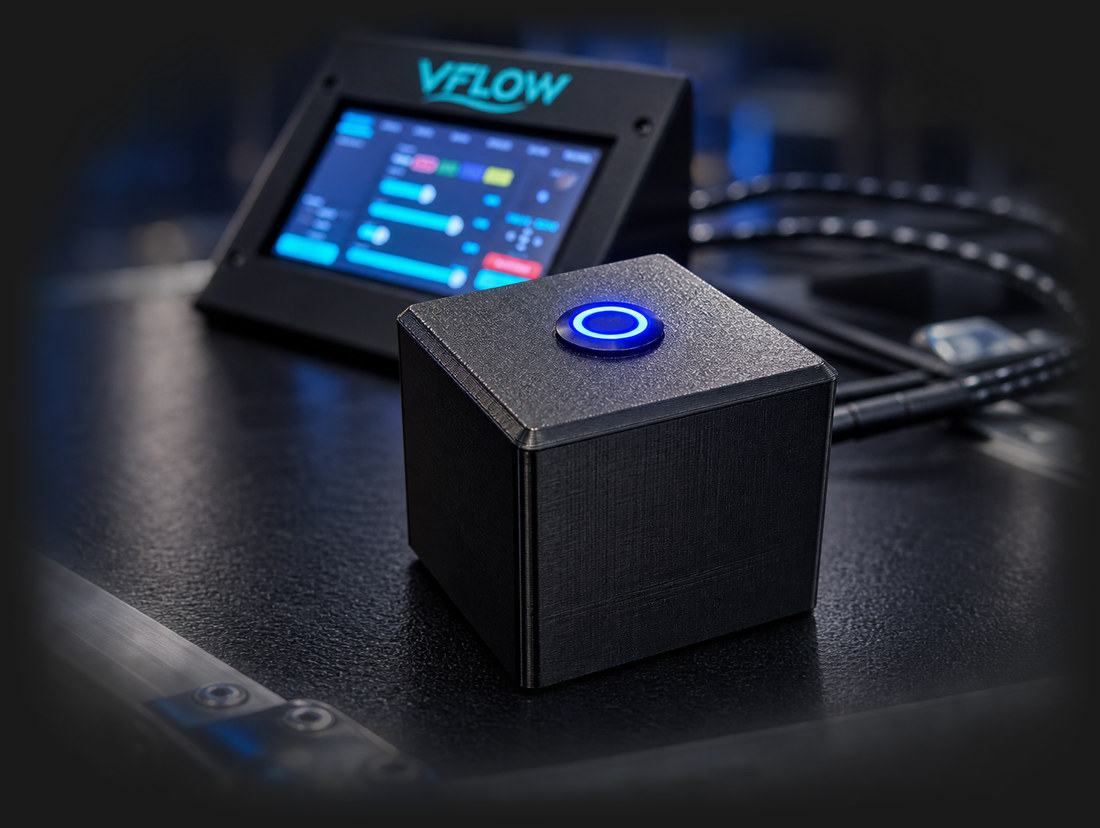
VFLOW touchscreen DMX controller running a live DJ show
VFLOW

VFLOW

Patch your lights once. Dial a flow. Tap to fire it to the music.

A standalone, 5" touchscreen DMX controller for moving heads, washes, and pars. The whole show lives on the unit — no laptop, no console, no software to install. Instead of programming cue-by-cue, you build a look and VFLOW drives your entire rig from it. Run it from the touchscreen, or walk the room and control everything from your phone.

$399 USD No laptop required Up to 16 fixtures Wi-Fi web control Over-the-air updates Online fixture library

Laptops are for spreadsheets,
not light shows.

See It In Action

Quick Demo

Real fixtures, real show — driven entirely from the touchscreen.

Quick Tour

A quick walkthrough of the interface and controls.

On the Unit

Straight off a VFLOW — not mockups. This is the 5" panel at its real 1280 × 720.

VFLOW OPERATE screen: live preview, pattern picker, group buttons, and motion sliders
OperateLive preview, pattern, groups, motion and the XY aim pad — the whole show on one screen.
VFLOW SCENES screen: eight scene slots with colour and pattern previews
ScenesEight slots showing the colours and pattern each one holds. Tap to fire, hold to save.
VFLOW COLOR screen: colour swatches and RGB sliders
ColourTwelve swatches, RGB and White/Amber/UV sliders, plus solid, alternate and chase modes.
VFLOW SETUP screen: fixture picker, patch list and the Find Fixtures RDM scan button
SetupPick a fixture and patch it, pull one from the Flow Library, or let Find Fixtures ask the DMX line what is out there.
VFLOW SETTINGS screen: themes, network, FlowLink, updates, trigger, MIDI and Auto Scene
SettingsThemes and brightness, Wi-Fi and FlowLink, updates, and the trigger, MIDI and Auto Scene controls.

Control It From Your Phone

Connect VFLOW to Wi-Fi and open a browser to vflow-xxxx.local from any phone, tablet, or laptop — nothing to install. You get the full control surface, mirrored live: every tab, every scene, every slider. Walk the room and tweak the show from the dance floor, or run the booth from your phone. The device and the web page stay perfectly in sync, both directions.

VFLOW web control interface open in two browser windows, mirroring the device live

The full VFLOW control surface, running live in a browser — device and phone stay in sync.

Everything It Does

VFLOW controller at a theater lighting console

🕹️ Standalone — No Laptop

The entire show runs on a 5" touchscreen. Patch your fixtures, build looks, save scenes, and run the night — no computer, no lighting console, nothing to install.

🔄 4 Movement Patterns

Circle, Figure-8, Sweep, and Wander (organic random drift). Each with adjustable speed, range, and phase so fixtures fan and cascade instead of moving in lockstep. VFLOW reads each fixture's real pan/tilt range to keep circles round across a mixed rig.

🎯 XY Aim Pad

Drag the pan/tilt pad to point your rig anywhere, nudge with the D-pad, or one-tap re-center. Set range to zero and the pad becomes a precise manual-position control.

🎬 8 Instant Scenes

Your busking surface. Build 4–8 go-to looks, save them across scene slots, and tap to fire them to the music — instant, no menus. Hold a slot to save, hold again to overwrite, and double-tap to rename right on the touchscreen or from your phone.

🎨 Full Color Engine

Solid, Alternate, or Chase across the rig. 12 instant color swatches plus R/G/B (and White/Amber/UV) sliders for any custom mix. Mixed rigs handle themselves — RGB heads mix the color, color-wheel heads snap to their nearest slot.

⬛ Black-as-Color Chases

Drop BLACK into a chase and VFLOW pulses the dimmer instead of rotating the color wheel — real, punchy strobing chase effects that most controllers can't do cleanly.

🔦 Complete Beam Control

Strobe, gobo, prism, frost, zoom, focus, iris, and lamp strike — every control your fixtures actually have, exposed automatically. Big-lamp moving heads and simple washes live side by side on the same rig.

🅰️ Groups (A / B / C / D)

Split your rig and run different looks on different lights at the same time — wash bars on a slow blue fade while your movers rip a fast red figure-8. Color-coded, per-group patterns, colors, and beam.

🌫️ Master Fade & Blackout

A real console workflow: instant Blackout or a smooth timed Fade to black and back, right from the scene page. Blackout, swap the look in the dark, then fade in — or fade out and snap on. HID-safe: it keeps discharge arcs struck.

📶 Phone & Tablet Control

Connect over Wi-Fi and open a browser to vflow-xxxx.local — the full control surface, mirrored live. Walk the room and tweak the whole show from your phone. Nothing to download.

☁️ the Flow Library

An online fixture library sourced from the open-source GDTF Share database and growing constantly. Browse, pick your exact model, and it downloads onto the unit over Wi-Fi — alongside hundreds of ready-to-run profiles.

Requires Wi-Fi to browse and download. GDTF profiles are open-source and community-maintained — outside our control, so always verify fixture response before a live show.

View all supported fixtures →

+ Don't see yours? Request a fixture →

🛠️ Custom Fixture Editor

Any light not in the library? Hand-build a profile on the touchscreen — assign each DMX channel a role. RGB washes, LED movers with color wheel/gobo, and traditional HID discharge fixtures all supported.

🔍 RDM Auto-Discovery

Stop reading addresses off the back of a truss. VFLOW asks the DMX line what is out there and the fixtures answer — manufacturer, model, current address, and how many channels they take. One tap patches the whole rig, and addresses already claimed by fixtures you haven't patched are left alone instead of trampled. Rebranded generics are matched back to the profile they really are.

🎛️ USB MIDI Control

Plug a class-compliant USB MIDI controller into the USB-A port and play the rig with real pads and knobs. Any controller — nothing is hard-coded to one model. Tap a slot, hit the pad or turn the knob you want, and it binds to whatever that control actually sends. Pads fire scenes, patterns, blackout, lamp and effects; knobs ride dimmer, speed, range, phase, strobe, fade and chase rate.

🎧 DJ Software Sync

VFLOW speaks OS2L, so Virtual DJ finds it on the network by itself — no IP to type in. Colour chases lock to the beat instead of drifting against it, and buttons in your DJ software fire scenes, blackout and effect groups straight from the deck. QLC+, MagicQ, Lightjams and Wolfmix speak it too.

💨 Effects Devices

Foggers, hazers and other DMX-triggered effect devices patched alongside the lights. Hold to fire or latch on, with an idle value held on the channel so a machine sits at rest between hits. One KILL stops everything at once, and the footswitch can be pointed straight at them — stomp for fog without touching the screen.

⏱️ Auto Scene

Let it run itself. VFLOW rotates through your saved scenes on a timer — anywhere from 5 seconds to 10 minutes — in order or shuffled. Set it going for dinner service or a support act, and take back manual control any time by tapping a scene.

🔗 FlowLink Multi-Unit Sync

Got two VFLOW units? Link them — one leads, the other mirrors its look phase-locked to its own fixtures. Perfect for a stage rig and a DJ-booth rig staying in step.

⬆️ Over-the-Air Updates

New features and fixtures arrive over Wi-Fi with one tap. Updates are safe — if one doesn't boot cleanly, the unit automatically rolls back to the previous firmware.

🦶 External Trigger Input

Wire a footswitch or contact closure to the unit and map it to Blackout, a specific Scene, cycle Pattern, Fade, fire Effects, or Hold Scene — hands-free, stomp-box style triggering during a set. Hold Scene jumps to a look for as long as you stand on it, then drops back.

🔒 Optional PIN Security

Lock the touchscreen and/or the web page with separate Admin and Operator roles — operators can run the show but not re-patch the rig. Ideal for venues, rentals, and volunteer crews.

🎨 8 Themes & Persistent Memory

Eight visual themes (Cyber, Crimson, Emerald, Sunset, Aurora, Mono, Amber, Mint) plus brightness control. Everything — patch, scenes, groups, settings — saves to flash and comes right back on power-up.

Technical Specifications

Display & Input

  • Display: 5" IPS Capacitive Touchscreen
  • Resolution: 1280 × 720
  • Interface: Full touchscreen — no physical buttons required

Control & Output

  • DMX Output: DMX512 (3-pin XLR)
  • Trigger Input: Contact closure / footswitch — 6 mappable actions
  • Fixture Capacity: Up to 16 fixtures, mixed rigs
  • Patching: RDM auto-discovery and auto-patch, or per-fixture manual addressing
  • RDM: ANSI E1.20 — discovery, identify, address and mode read-back
  • Movement: Circle, Figure-8, Sweep, Wander
  • Groups: 4 (A/B/C/D), independent looks
  • Scenes: 8 instant-recall slots, with timed Auto Scene rotation
  • Effects Devices: Foggers, hazers and other DMX-triggered devices — momentary or latching
  • Color Modes: Solid, Alternate, Chase

Connectivity

  • Wi-Fi: Phone/tablet web control (full mirror)
  • Discovery: vflow-xxxx.local (mDNS)
  • Updates: Over-the-air, with auto-rollback
  • Note: Wi-Fi required for the Flow Library and firmware updates — not required to run lights
  • USB MIDI: USB-A host — any class-compliant controller, fully re-mappable
  • DJ Software: OS2L over Wi-Fi — Virtual DJ, QLC+, MagicQ, Lightjams, Wolfmix
  • Multi-Unit: FlowLink leader / follower sync
  • Security: Optional PIN lock, Admin / Operator roles

Fixture Support

  • Library: the Flow Library — online, GDTF-sourced, growing (Wi-Fi required) — plus hundreds of ready-to-run profiles. Community-maintained; always verify before a show. View full list
  • Custom Profiles: On-device DMX channel editor
  • Fixture Types: RGB wash, LED with color wheel/gobo, HID discharge

System

  • Processor: ESP32-P4 + ESP32-C6 (Wi-Fi 6)
  • Storage: Flash memory (persistent settings)
  • UI Themes: 8, with adjustable brightness

Power

  • Power Input: USB-C — use the supplied adapter when the USB-A port is in use

Perfect For

🎧 Mobile DJs & Bands

Show up, plug in DMX, dial a flow, and busk the night by tapping scenes to the music. No console to haul, no programming session before the gig.

🍸 Bars, Clubs & Venues

A self-contained controller for permanent installs where reliability and simplicity beat console complexity. Lock it down with a PIN and let staff run presets.

⛪ Churches, Schools & Theaters

Approachable enough that a volunteer or student can run a service or show with minimal training — but capable enough to drive a real moving-head rig.

🎪 Touring & Rental

Compact enough for a road case, powerful enough to run the rig. The online library and auto-addressing mean fast turnarounds between rooms and shows.

How VFLOW Compares

Ditch the laptop. Cancel the subscription. Other controllers make you carry a fragile laptop to the gig, pay a monthly software fee, or spend well over twice the price just to get standalone control. VFLOW is a $399 standalone touchscreen DMX brain that pulls fixture profiles straight from Wi-Fi and has you running a show in minutes.

Feature comparison between VFLOW, Wolfmix W1 MK2, SoundSwitch and the Chauvet Obey 40
Feature VFLOW$399 WolfmixW1 MK3 / ADJ WMX1 SoundSwitchControl One ChauvetObey 40
Retail price$399No subscription, ever~$811Extra DMX universes $99 each$299 + subscription$7.99/mo or $79.99/yr after the trial~$200Manual programming only
Runs the show with no computerNeeds a laptop or Denon hardware
Touchscreen interface5" · 1280 × 7204.3" colour touchscreenOn your computerFaders and buttons
Control from your phone, no appAny browser over Wi-FiNo wireless control
Finds fixtures automatically (RDM)Discovers and auto-patches
Fixture profiles straight over Wi-FiBrowse ~11,500 GDTF profiles and download to the unit — no computerProfiles loaded from a desktop app over USBLibrary lives in the computer softwareManual DMX addressing
Build your own fixture profileOn the touchscreenOn a computerIn the app
USB MIDI controllerAny class-compliant, fully re-mappableDirect over USB-AVia your DJ software5-pin MIDI in, scene triggering
Sync to DJ softwareOS2L — Virtual DJ, QLC+, MagicQAudio/BPM detectionIts core featureSound-active mode
Link two units togetherFlowLink over Wi-Fi — follower renders the look on its own rigWLINK, wired, for secondary controllers and faderboards
Free over-the-air firmware updatesOne tap, with auto-rollbackVia a computerApp updates
Subscription requiredNeverOngoing

yes   partly or with conditions   no. Competitor details are taken from publicly available manufacturer specifications and may change — prices checked August 2026 — check the current spec sheet before you buy. All trademarks belong to their respective owners.

Common Questions

Do I need a laptop or software to run VFLOW?

No. VFLOW is a standalone DMX controller — the entire show runs on the unit's 5-inch touchscreen. You patch fixtures, build looks and save scenes on the device itself. There is no computer, no lighting console and nothing to install.

How many fixtures can VFLOW control?

Up to 16 fixtures, and they can be a mixed rig — moving heads, washes and pars from different manufacturers all on the same line, each using its own profile.

Will VFLOW work with my lights?

Most likely. VFLOW ships with hundreds of ready-to-run profiles and can download more from the Flow Library, an online library sourced from the open-source GDTF Share database. If a fixture is not listed, you can build a profile on the touchscreen by assigning each DMX channel a role.

Can I control the lights from my phone?

Yes. Connect VFLOW to Wi-Fi and open a browser to vflow-xxxx.local from any phone, tablet or laptop. You get the full control surface mirrored live — every tab, every scene, every slider. There is no app to download.

Does VFLOW need Wi-Fi to run a show?

No. Wi-Fi is only needed to browse the Flow Library, use phone control and install firmware updates. Once your fixtures are patched, VFLOW runs the show entirely on its own.

Can I use a MIDI controller with VFLOW?

Yes. Plug any class-compliant USB MIDI controller into the USB-A port. Nothing is hard-coded to one model — tap a slot, then hit the pad or turn the knob you want and it binds to whatever that control actually sends. Pads fire scenes, patterns, blackout and effects; knobs ride dimmer, speed, range, phase, strobe, fade and chase rate.

Does VFLOW work with Virtual DJ?

Yes. VFLOW speaks OS2L, so Virtual DJ discovers it on the network by itself with no IP address to type in. Colour chases lock to the beat, and buttons in your DJ software can fire scenes, blackout and effect groups. QLC+, MagicQ, Lightjams and Wolfmix speak OS2L too.

Can VFLOW find my fixtures automatically?

Yes, if your fixtures support RDM. VFLOW asks the DMX line what is connected and the fixtures answer with their manufacturer, model, current address and channel count. One tap patches the whole rig, and addresses already claimed by fixtures you have not patched are left alone.

Can I run two VFLOW units together?

Yes. FlowLink links two units — one leads and the other mirrors its look, phase-locked to its own fixtures. It syncs the look rather than raw channels, so the follower can be driving a completely different rig.

Can I trigger VFLOW with a footswitch?

Yes. Wire a footswitch or contact closure to the trigger input and map it to Blackout, a specific Scene, cycle Pattern, Fade, fire Effects, or Hold Scene — hands-free triggering during a set.

Ready to Take Control?

VFLOW touchscreen DMX controller

VFLOW Touchscreen DMX Controller

$399.00

Shipping Soon

Get Notified

✓ 30-Day Money-Back ✓ 1-Year Warranty ✓ Hand-Assembled in Southern California